

SecurityKey NFC User Guide
SecurityKey NFC is the mobile tool to manage your ATKey.Card NFC.
It makes possible to fine tune your ATKey.Card NFC operations anywhere you are.
Is available for IOS or Android.


SecurityKey NFC Dashboard
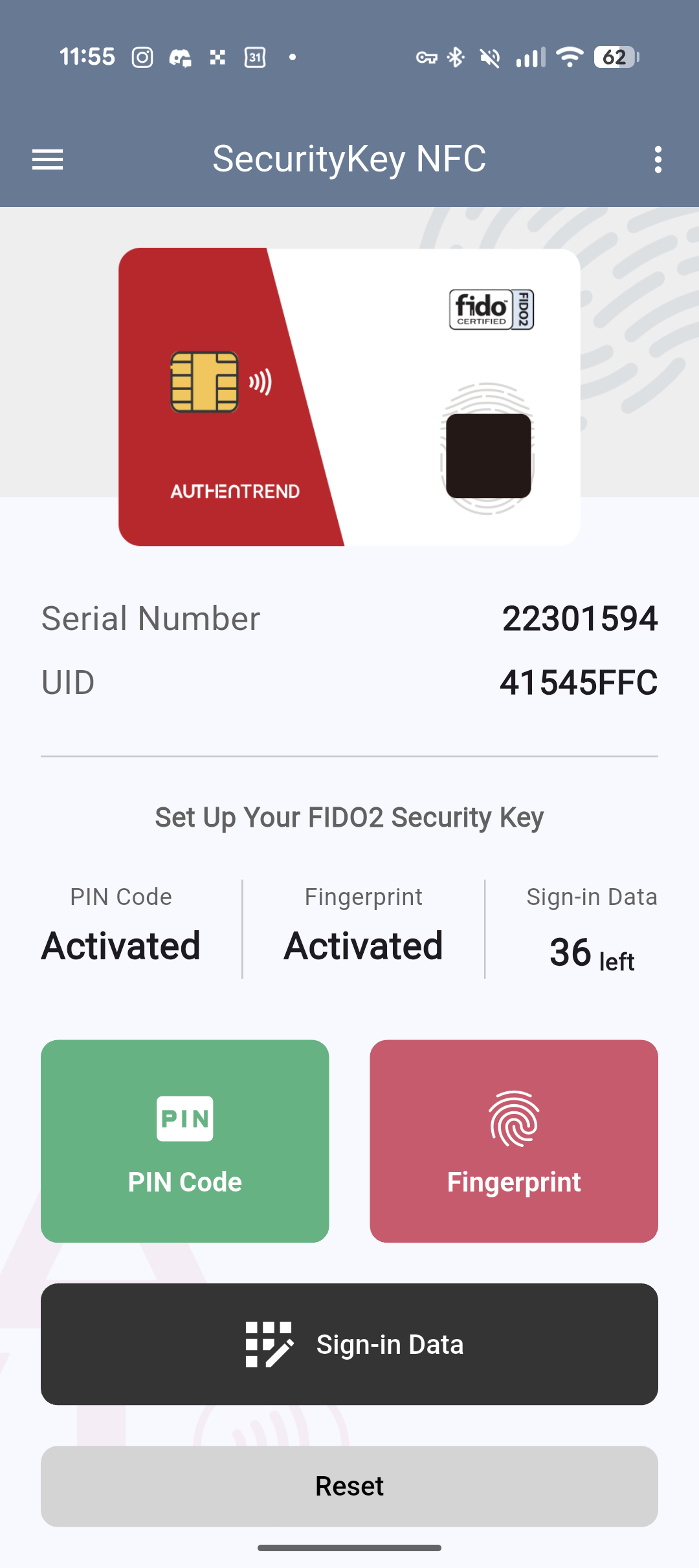
This is the central hub to manage your ATKey.Card NFC.
Here you can see the card’s serial number, and its MIFARE UID.
Further down you can see if the PIN and he fingerprint protection are currently active, along with how many FIDO2 credentials can still be stored on this ATKey.Card NFC (for a maximum of 38).
Under you can manage the PIN or the fingerprints registered on the card. Change the PIN or enroll new fingerprints.
If this is the first time using this specific ATKey.Card NFC or the card has been resetted you will be prompted to create a PIN first of all and only after you will be able to enroll your fingerprint. This is a necessary step in the FIDO2 protocol.
Under sign in data, you can manage the credentials stored in your ATKey.Card NFC one by one.
And finally, if you need a clean start for this card you can use the Reset button at the bottom of the page. It will eliminate all the credentials, fingerprints, and PIN giving you a completely fresh ATKey.Card NFC. This action is permanent. resetting the card you will lose access to any account that uses it as only form of login.
Heading to the hamburger menu in the upper left corner you can have access to other four sections.
Certificates
Here you can visualize the PIV certificates loaded on the card. Does not allow to modify them.
If you need to upload PIV credentials, please use SecurityKey Desktop.
ATKey.Card NFC and ATKey.Badge have 4 PIV slots available:
Slot 9a - Authentication
This is the main slot; it identifies the user with any service they are trying to login with.Slot 9c - Digital Signature
This slot is used to sign documents and files marking the user has the signerSlot 9d - Key Management
This slot is used for encryption. The key here stored is used to encrypt documents, messages, and ensure confidentiality.Slot 9e - Card Authentication
This slot is used for physical access.
Digital Biz Card
Here you can manage the Digital Business Card function. Activate or deactivate it, as well as making the Digital Business Card available only after a successful fingerprint verification.
Developer
Read Information
By connecting the ATKey.Card NFC it allows you to read all the information stored on the card:
Tag info
CTAP2 Info
Extensions
AAGUID
and optional setting status
Read Information
You can use this feature to better understand where to place the card when using this mobile phone. As long as the card is in range the app will be printing out the strength value for the connection.
Above 6000 is where the readability will be quick and clear.
Read NDEF Message
Since most ATKey.Card NFC support the digital business card functions you can quickly check the broadcasted NDEF message through this option.